
The Add New button is now actually two adjoining buttons
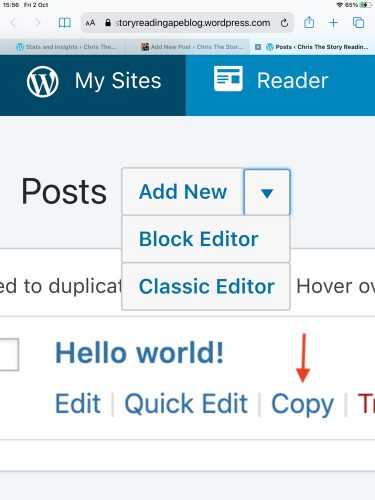
Click on the small one on the right of the Add New part – this will give you a drop down menu where you can select Block Editor (top one) or Classic Editor (bottom one)
SAVE THE CLASSIC EDITOR BROWSER LINK AS A FAVOURITE OR BOOKMARK, so you can go straight to adding a new post in the Classic Format…
If you (like me) accidentally click only on the Add New part, and draft, or start a post in the Block Editor, the only way I’ve found to change it is to save and back out of it, then go to your draft posts menu.
For every post, this will give you the following two lines of options:
(Top line) Edit – Classic Editor – Quick Edit
(Bottom line) Copy – Trash – Preview
Select the Classic Editor for the post you want to finish or continue with properly.
If all else fails, adapt and try: https://yourblogname.wordpress.com/wp-admin/post-new.php?classic-editor
If it works, save it in your favourites or bookmarks.
Hope this helps.
 Chris The Story Reading Ape's Blog
Thanks for this, Chris. I’m trying to get back into the blogging habit and was struggling with the block editor. This is helpful.
I was close to giving up and backing off down the road of blog oblivion!
Christine
LikeLiked by 1 person
Glad it helped you, Christine 👍🤗
LikeLike
The last post I published was on the 30th September … I just checked and the buggers must’ve turned my region over the beginning of the month … I will, grudgingly, now go forth and joust with this complete and utter dog’s breakfast, because sooner or later the classic version will be gone. In the meantime, thank you for the link. It still works for me.
LikeLiked by 1 person
Welcome, Widdershins 👍😃
LikeLiked by 1 person
They are retiring it though. It will be going away forever soon apparently. But they may look at a drag and drop approach to blocks which is what my email list provider does and that’s a lot easier.
Cheers
MTM
LikeLiked by 2 people
GROAN 😱😫🥺🤬
LikeLiked by 2 people
Yeh, I know. 😭
LikeLiked by 2 people
Yay! Not sight impaired but certainly site-impaired, for a time, until I followed your “if all else fails …” advice! Thank you so much!
LikeLiked by 1 person
GREAT – Glad it worked for you, Richard 👍
LikeLike
Thanks so much, Chris!
LikeLiked by 1 person
Welcome, Bette 🤗❤️🤗
LikeLike
Thank you for the very useful information, Chris! Will solve some problems i had with this new editor. Have a beautiful weekend, and stay save! Michael
LikeLiked by 1 person
Thanks, Michael, you stay safe too 👍😃
LikeLiked by 1 person
Thank you Chris! 😃
LikeLiked by 1 person
I don’t mind block editor, but I know it’s annoying for a lot of bloggers. This is good info, thanks!
LikeLiked by 1 person
Welcome, Jacquie 🤗❤️🤗
LikeLiked by 1 person
Alas, mine doesn’t appear like this. I do not know why. I am trying my best in block land.
LikeLiked by 1 person
Is yours a paid, premium theme, or, a free theme Annette?
LikeLiked by 1 person
Free and I must say that the link you put in, WORKS! ❤
LikeLiked by 1 person
👍🤗❤️❤️❤️🤗
LikeLiked by 1 person
Many thanks for posting this Chris. I shall keep an eye on any comments here to see whether any other visually impaired users have better luck than I did in reverting back to Classic. Best wishes, Kevin
LikeLiked by 1 person
You’re welcome, Kevin
LikeLike