
Great information for bloggers, now, if only I knew how to transfer my existing library into galleries without losing their existing links, I’d be a VERY happy little ape 🐵
My thanks to Johann in the comments for letting me know the problem he had trying this.
I think it must be either for premium or self-hosting sites – Darn it…
However, another way to group images on posts is to make a Table in your word processor, copy and paste it into your blogpost and insert the images from your Media.
That’s how I did it on my TSRA 3D Books page at:
https://thestoryreadingapeblog.com/tsra-3d-books/

…MOST OF US use a picture in a post to enhance the impact. Usually the blogs I see have one main picture for the header and maybe a few more scattered throughout the post.
What if you want to group several pictures together? What then?
Here’s how you do it:
Click on ‘Add Media‘ (of course)
Then click the left hand side on ‘Create Gallery‘
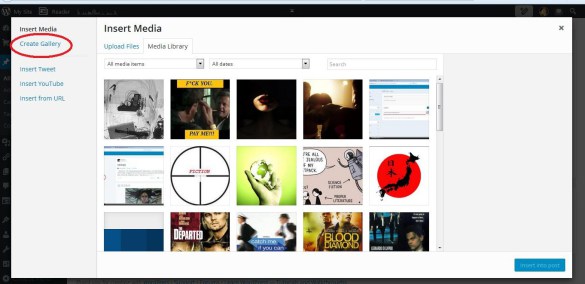
With that selected you then choose the pictures you want simply by clicking on multiple images
Click ‘Create a new gallery‘ and you will be in a new window giving you options on how you would like the photos to appear in the post; tiled, mosaic etc. Insert into post and there you have it, pictures grouped together instead of requiring formatting that never quite works without ruining the text at the same time.
Column:
Tiled mosaic
View original post 1 more word
 Chris The Story Reading Ape's Blog
More fantastic advice – I’m going to use it.
LikeLiked by 1 person
Check my Intro Noelle 😀
LikeLike
Sounds interesting Chris, must investigate it further, thanks for the link…
LikeLiked by 1 person
Check out my intro Marje 😎
LikeLiked by 1 person
Thanks Chris, have done.. should come in handy.. 🙂
LikeLiked by 1 person
😀
LikeLiked by 1 person
I will be looking into this, as I am always seeking ways to improve upon my presentation.Thanks!!
LikeLiked by 1 person
See my intro Annette 😎
LikeLiked by 1 person
(deep sigh) still, one day, I may grow into a premium site and therefore, this information will come in handy. Until then, I’m hanging wit-chews! ❤
LikeLiked by 1 person
As long as you don’t go all self-hosted Annette, I can’t reblog posts from them 😱
LikeLiked by 1 person
Wherever I go, I know YOU go. Amigos, forever 🙂
LikeLiked by 1 person
😘
LikeLiked by 1 person
Really helpful, thank you x
LikeLiked by 1 person
Hope it helps Lisa 👍
LikeLiked by 1 person
thank you for the awesome tip!
LikeLike
I tried it…I did get all on to ONE post…but somehow I did not get into the OPTIONS window? What step did I miss? thank you!
LikeLiked by 1 person
You’re right Johann, I think it must be either for premium or self-hosting sites – Darn it…
I CAN tell you however, another way to group images on posts is to make a Table in your word processor, copy and paste it into your blogpost and insert the images from your Media.
That’s how I did it on my TSRA 3D Books page at:
https://thestoryreadingapeblog.com/tsra-3d-books/
LikeLike