
The Add New button is now actually two adjoining buttons
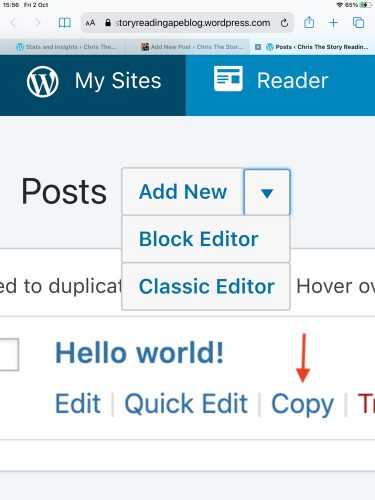
Click on the small one on the right of the Add New part – this will give you a drop down menu where you can select Block Editor (top one) or Classic Editor (bottom one)
SAVE THE CLASSIC EDITOR BROWSER LINK AS A FAVOURITE OR BOOKMARK, so you can go straight to adding a new post in the Classic Format…
If you (like me) accidentally click only on the Add New part, and draft, or start a post in the Block Editor, the only way I’ve found to change it is to save and back out of it, then go to your draft posts menu.
For every post, this will give you the following two lines of options:
(Top line) Edit – Classic Editor – Quick Edit
(Bottom line) Copy – Trash – Preview
Select the Classic Editor for the post you want to finish or continue with properly.
If all else fails, adapt and try: https://yourblogname.wordpress.com/wp-admin/post-new.php?classic-editor
If it works, save it in your favourites or bookmarks.
Hope this helps.
 Chris The Story Reading Ape's Blog
Thank You for posting this! Works great (for now?). At least until someone at WP decides it won’t. I’m not visually impaired, but prefer the old editor. I probably should attempt to learn the new, at least enough that I don’t use foul language when I post. At least I’d have a clue when they take the classic away permanently.
I was being all smug about no changes forced on us at WP while reading the woes of people who use Blogger and those changes. And then they did change it. I won’t do that again.
LikeLiked by 1 person
👍😃
LikeLike