
Great find by Nicholas
Here’s my example 😀
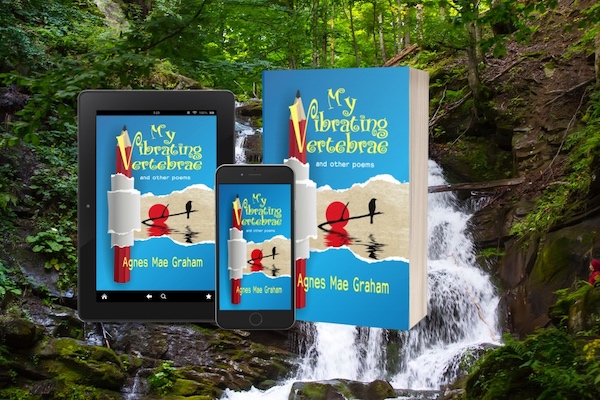

I recently discovered DIY Book Design (thank you, Krystallia!) and just had to share the news.
DIY Book Design has a number of useful tools and tutorials, all aimed at helping you produce the perfect image for your book. From a number of tutorials helping with the design of your book cover to taking that cover and transforming it into a great-looking 3D mockup, DIY Book Design has got you covered.
It’s this last feature that caught my eye. You get to choose between a Single and Composite look for your books. The Single look lets you display your book as a Kindle/tablet/mobile/paper standalone image:

The Composite view lets you design a combination featuring various formats:

Generating the mockup is as simple as 1-2-3, as the interface guides you through the entire process. You get the option of creating a white or transparent background for your books. The whole process…
View original post 126 more words
 Chris The Story Reading Ape's Blog
Thanks, Nicholas! 🙂
LikeLiked by 1 person
Thank you for that. I’m almost ready for a cover for my latest wip. I’ll look this out.
LikeLiked by 1 person
These are 3D mock ups, using existing covers, for promotional purposes, Viv – not to make covers from scratch 😎
LikeLike
Oh, and I loved your example! I’ll bet it didn’t take long to make, right?
LikeLiked by 1 person
Fast and furious, Nicholas LOL
LikeLiked by 1 person
Many thanks for the share, Chris! I hope you find it useful 🙂
LikeLiked by 1 person
Certainly quicker than doing it myself, using BoxShot, Nicholas 😀
LikeLiked by 1 person