
Have you been using images that are VERY LARGE, and/or, PNG Format?
Have you been reblogging and noticed how LARGE, some folks make their images?
Result
Running out of space in your WordPress Media Storage and thinking about paying for more?
Unless you are displaying your own images / photos, and WANT to have them full size
Before you spend any money, go through your Media Storage images and reduce their sizes
You might be shocked at how much longer you can work with the storage space you save.
Step 1:
Select an image and click on it to see its size (width x height in pixels)
and
how much it ‘weighs’ (i.e., how many KB or MB it is):
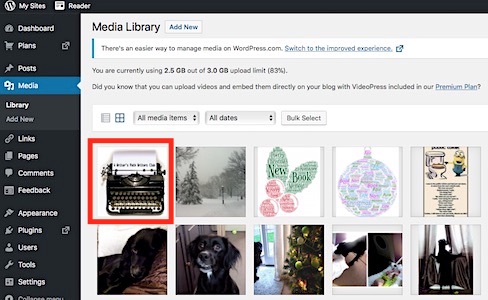
Step 2
My example has already been adjusted, but you can see its size and weight
To reduce them, click on the Edit Image button shown under the image:
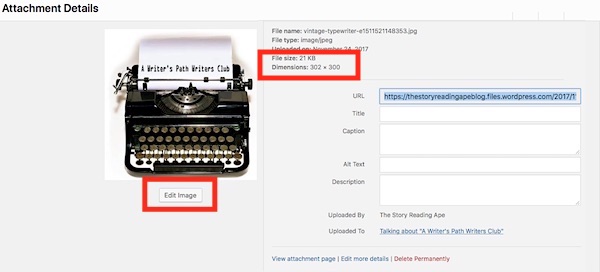
Step 3
Adjust the size
I use either 600 wide, OR, 300 high
because each WP post width allowance is only 600 pixels.
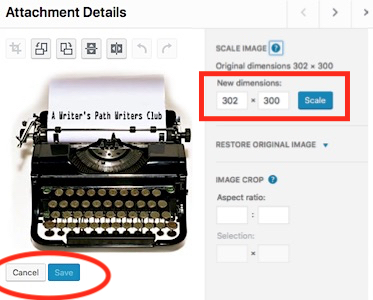
Authors Please Note:
Although it is tempting to display your book covers full size
at least use JPG Format and NOT use PNG format.
Also
Just use 6oo wide JPG images
They’ll STILL look awesome
For Example:
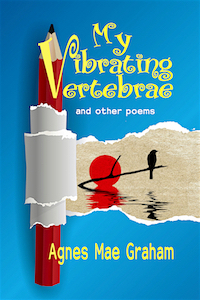
My Mum’s book cover sizes and weights:
2000 x 3000 pixels PNG is 3.5MB
2000 x 3000 pixels JPG is 1MB
600 x 900 pixels JPG (shown below) is 145 KB (0.145MB)
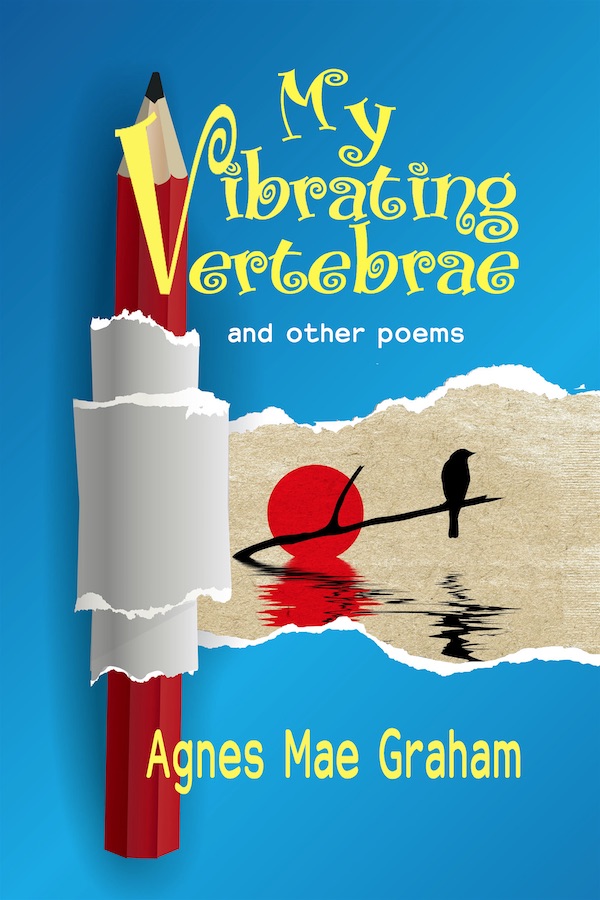
at 200 x 300 pixels JPG (see below) it is 24 KB (0.024MB)
 Chris The Story Reading Ape's Blog
Dear Chris I really have had to come back to thank you again for for this information, I sat and have just altered one years worth of blogging photos and its given me another 1% space, now all I need it to go back and keep doing that till 2010 when I first transferred my blog to WP.. So A Very BIG Thank you again. 🙂 Sue
LikeLiked by 1 person
It does take a lot of time, Sue – but every little helps 😀
Don’t forget to also read my other two follow-up tips at:
https://thestoryreadingapeblog.com/2017/11/25/blogger-tip-02-how-to-reduce-the-number-of-images-required-in-your-wordpress-media-and-save-storage-space/
and
https://thestoryreadingapeblog.com/2017/11/25/how-to-access-the-better-old-wordpress-admin-and-media/
LikeLiked by 1 person
Thank you Chris, I will, 🙂 Many thanks again, and I will be sure to let you know the total of space I saved, as I use lots of images 🙂
LikeLiked by 1 person
Thank you for this information, It is something I am fast running out of, so I will go and try this. Many thanks Chris 🙂 Sue
LikeLiked by 1 person
Welcome, Sue – Good Luck with it all 🤗
LikeLiked by 1 person
Thank you
LikeLiked by 1 person
Thank you, Chris, I really needed this advice as I use loads of photographs.
LikeLiked by 1 person
Welcome, Robbie 👍😃
LikeLiked by 1 person
Thanks for that, Chris. First job tomorrow, I think.
LikeLiked by 1 person
Good Luck with it, Viv 😃
LikeLike
Reblogged this on Writer's Treasure Chest and commented:
Phenomenal! On The Story Reading Ape’s blog I found blogger tip #1 to save storage space when it comes to our pictures. It’s a really important post to read for our very busy bloggers. Thank you, Chris!
LikeLiked by 1 person
Welcome, Aurora 🤗
LikeLiked by 1 person
Wow! What great information to have. Thanks, Chris.
LikeLiked by 1 person
Welcome, Jan 😃
LikeLike
I’ll definitely have to check my sizing. Thanks, Chris. 🙂
LikeLiked by 1 person
Welcome, Tracy – see also Part 2 and the Follow Up posts after this one 😃
LikeLike
These 3 posts are great, Chris. Thanks so much. I’ve shared them across my pages ❤
LikeLiked by 1 person
Thanks, Tina 👍😃❤️❤️❤️
LikeLiked by 1 person
❤️❤️❤️
LikeLiked by 1 person
Thanks, reblogged this too–looks like I might be able to do this one.
LikeLiked by 1 person
Don’t forget Part 2 as well, Micki 😃
LikeLike