
How to add StumbleUpon to your Blog Share Buttons 😀

Last night I ran across a Blog that had a StumbleUpon button on their Blog so that people could share their work if that wanted to do so.
I was like how is that possible, WordPress got rid of that. So research I did. Then I ran across Debby Gies’s Google Plus Page where she shared an article about “The Power of StumbleUpon” which I read, then I was like SOB! So there I am at my desk just shaking my head.
So, if you would like to put a StumbleUpon button on your Blog, then follow these simple steps.
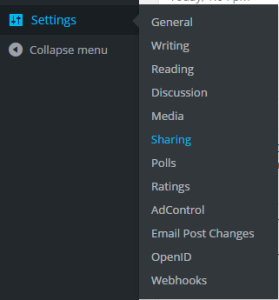
Go to your Dashboard,
Then settings
Then click on Sharing.
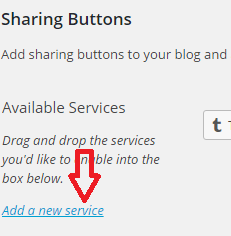
Locate
Add a new Service
When you click on “Add a new service”
A new popup window will open
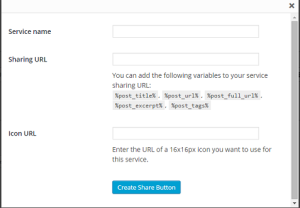
Service Name: Enter Stumble Me (if feeling like a smart butt)
Sharing URL: Copy the below URL…
View original post 87 more words
 Chris The Story Reading Ape's Blog
Thanks for publishing this. It made me look at my own blog and I realised that the social sharing plugin I use doesn’t make StumbleUpon easy for readers to use. I’ve been reading this week elsewhere about the advantages of using that site, so something that I need to take a closer look at.
I can’t see a way to add it via the WP dashboard, maybe that’s because I was looking at the mobile version.
Thanks again for the heads up!
LikeLiked by 1 person
Great information Chris! I’ll have to go look on my blog to see if I have it there!
LikeLiked by 1 person
This is great!! I never knew how to get the little picture on there before!! Thanks for sharing Chris! Will reblog!
LikeLike