
Here’s a useful post from author P. H. Solomon.
It’s got 5 links to other Scrivener articles as well 😀

Scrivener is a powerful writing tool. I write about it weekly with tips and usage ideas. To read more of my posts click the Scrivener tag or category at the end of the page.
The Inspector in Scrivener hides a number of useful features. Previous posts on Archer’s Aim regarding the Inspector include:
Inspection! What Scrivener’s Other Bar Does
Strategic Usage of Snapshots in Scrivener
Keywords & Project Searches in Scrivener
Lost Your Scratchpad? Here It Is In Scrivener!
This week we continue with use of Document References from the Inspector.
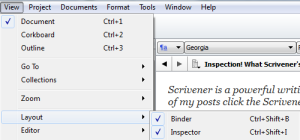
Just as a refresher, the Inspector is turned on by clicking on View in Scrivener. Slide down the menu to Layout and click on Inspector in the fly-out menu that is displayed (for keyboard command enthusiasts use CTRL + Shift + I).
The Document References are accessed using the second from the left button located…
View original post 321 more words
 Chris The Story Reading Ape's Blog
Love a scrivener post – will bookmark and read après work 😊
LikeLiked by 1 person
Tsk, Tsk, The Company profits will plummet AGAIN because Sacha is reading blog posts 😀 😀 😀
LikeLiked by 1 person
lol no no, I book marked it, going to read it later after I’ve done some writing 🙂
LikeLiked by 1 person
😀 😀 😀
LikeLike